
Holman Insights
HolmanAuto & Vehicles
4.4132.00 Reviews
- Version
- 9.0.8
- Installs
- 50.00K
- Age Rating
- Everyone
Screenshots
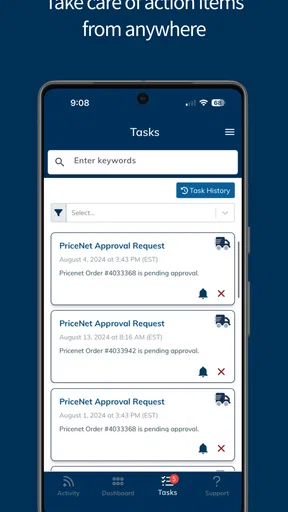
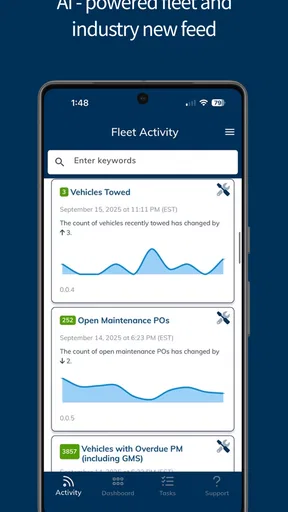
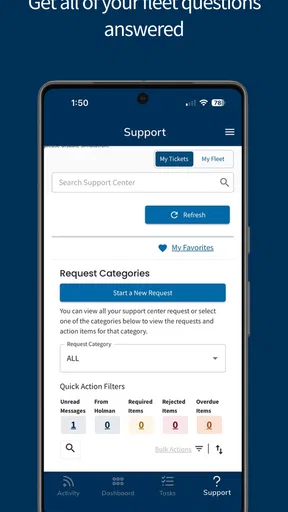
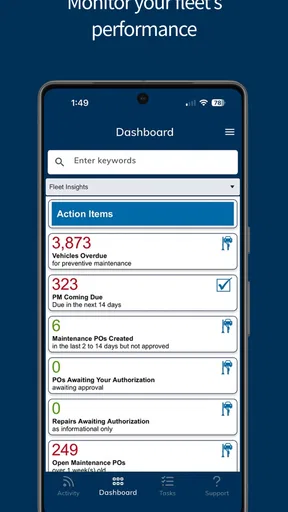
Our Review of Holman Insights
 Analysis by Appyee
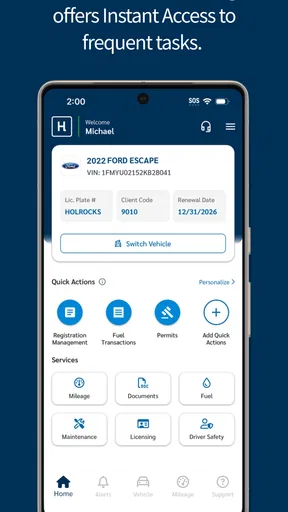
Managing a vehicle usually becomes difficult in small, forgettable moments: remembering the last service visit, checking whether licensing is current, finding a fuel record, or locating an order connected with the car. Holman Insights is built around those practical details rather than entertainment or navigation. It is a free Auto & Vehicles app from Holman that brings mileage, maintenance, licensing, fuel, and orders into one place.
I found the appeal easy to understand during the first week. Instead of treating vehicle ownership as a collection of receipts, reminders, and separate conversations, the app gives those recurring responsibilities a single home. That does not make car administration exciting, but it can make it less scattered. The real question is whether that convenience survives after the initial setup and curiosity fade.
My short answer is that it can, especially for someone whose vehicle is connected to Holman and who regularly needs to check its status. It is less compelling as a general-purpose car log for every driver. The app’s value depends heavily on how much relevant information is available for your particular vehicle and how often you need to consult it.
What the first week feels like
The first useful task is learning where the important vehicle information lives. Mileage, maintenance, licensing, fuel, and orders are all areas people tend to handle separately. A mileage note may be in a phone reminder, a maintenance detail may be on an invoice, and an order update may be buried in a message. Holman Insights gives these subjects a common destination, which is the main reason to try it.
I would not install it expecting a dramatic transformation. This is a quiet utility, and its first-week benefit comes from reducing small bits of searching. If I want to check a vehicle-related detail, opening one app is more convenient than reconstructing the answer from paperwork or memory. That is a modest improvement, but repeated small improvements are exactly what make vehicle-management tools worthwhile.
The app is particularly sensible for drivers who are responsible for a vehicle as part of a work routine, a managed arrangement, or a larger household. In those situations, the vehicle may involve more than simply filling the tank and visiting a mechanic. Licensing and orders can matter alongside maintenance, while mileage and fuel information help provide a clearer picture of use.
For a person with one privately owned car and a strong personal system already in place, the first-week appeal is more limited. If you already maintain a reliable spreadsheet, calendar, folder of receipts, and fuel log, Holman Insights may feel like another place to check rather than a replacement for anything. The convenience is greatest when the app removes duplication instead of creating it.
One practical habit helped me judge the app more fairly: I treated it as a dashboard for checking information, not as a complete substitute for every vehicle record. That distinction matters. A dashboard is useful when I need a quick view of the current situation. A full personal archive has different needs, such as storing every receipt, note, photo, and repair detail. Holman Insights is more naturally suited to the first job.
The app has been available since January 4, 2017, so it is not a brand-new experiment. Holman is the developer, and the current version is 9.0.8. Those details suggest a product intended to remain useful over time rather than a short-lived novelty, although long-term usefulness still depends on whether the information connected to a user’s vehicle stays current.
A realistic everyday example
Imagine preparing for a longer work trip and wanting to make sure the vehicle is in order. I might first check the mileage, review the maintenance information, look at licensing details, and then check whether an outstanding order is relevant. In a typical setup, that process could involve a dashboard, a paper document, a service email, and a separate note about fuel. Having the vehicle-related sections together makes the check more deliberate and less dependent on memory.
Another useful moment comes after using the car regularly for several weeks. Rather than asking, “When did I last deal with that?” I can open the app and look at the relevant category. This is where a vehicle app earns its place: not through constant interaction, but by being dependable when a small administrative question appears.
There is also a useful trade-off in keeping fuel and mileage near maintenance information. Fuel alone is often just a running cost, while mileage alone is just a number. Seen together with maintenance, they provide better context for deciding when a vehicle deserves attention. I would still avoid making mechanical decisions from a single entry, but the combined view can prompt a more sensible check of the car’s history.
Why it may still matter month after month
The strongest recurring value is not the novelty of seeing vehicle information in an app. It is the possibility of building a simple checking routine. At the beginning of a month, after a service visit, or before a trip, I can use the app as a quick status point. That kind of routine is more sustainable than opening it every day without a clear reason.
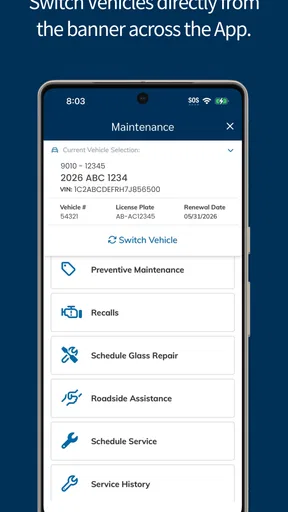
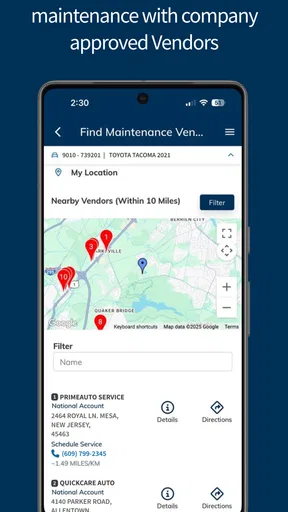
Maintenance is the area where consistency matters most. People often remember that a vehicle was serviced but forget the surrounding details. A central view can make it easier to connect mileage with maintenance activity, which is more useful than either item in isolation. My advice is to check the maintenance area after any relevant work rather than waiting until the next problem appears. The habit is small, but it turns the app into part of a preventive routine.
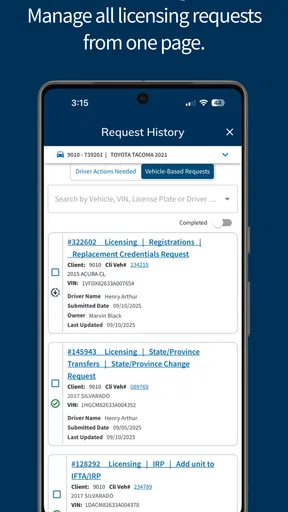
Licensing information has a different kind of value. It is not something I need to inspect constantly, but it is exactly the sort of obligation that becomes stressful when overlooked. A quick periodic check can prevent a last-minute scramble. I would still keep any official paperwork or confirmation that I personally need, but the app can serve as a convenient first stop when I want to know where things stand.
Orders may be the most situational section. If I have an active vehicle-related order, checking it can be useful; if I do not, that area may have little reason to bring me back. This is an important distinction between recurring value and permanent relevance. Some parts of the app are useful only during particular periods, while mileage and maintenance are more naturally ongoing.
Fuel information can also become more useful when reviewed as a pattern rather than a single event. I would use it to notice whether my records look complete and to support broader household or work-related tracking. I would not expect it to replace a dedicated expense tool if I needed detailed budgeting, categories, exports, or extensive reporting. Holman Insights is better judged as a vehicle-focused reference point than as a full finance application.
A good monthly workflow is therefore selective. I would check mileage and maintenance routinely, review licensing at sensible intervals, look at fuel when tracking use matters, and open orders when something is in progress. That approach avoids the common mistake of turning a practical app into another notification-heavy obligation.
Who gets the most lasting value
The app makes the most sense for a Holman vehicle user who wants a central place for the vehicle’s operational details. It is also a reasonable choice for people who share responsibility for a car and need a consistent reference point rather than relying on one person’s memory. Someone who frequently deals with mileage, servicing, licensing, fuel, or orders is more likely to keep finding reasons to return.
It is less suitable for a driver looking for route planning, live traffic, roadside assistance, detailed fuel-price comparisons, or a broad repair encyclopedia. Those are different jobs. A navigation app is better for directions, a budgeting tool is better for household spending, and a detailed personal log may be better for storing photographs and repair notes. Holman Insights should not be penalized for not being all of those things, but users should choose it for its actual focus.
The audience also matters because the app is tied to Holman vehicle information. If your vehicle is not part of the relevant Holman setup, the reason to rely on the app becomes much weaker. This is not a universal car-management tool that automatically becomes useful for every vehicle simply because it is installed. Its practical value comes from the relationship between the app and the vehicle information it is designed to present.
Maintenance burden and the work users still need to do
The app can organize information, but it cannot remove the responsibility of checking whether that information is accurate or current. I would still compare important details with official documents and service paperwork when a decision has consequences. A convenient dashboard should support good vehicle habits, not replace judgment.
That creates the first maintenance burden: remembering to look at the app at the right moments. A tool that contains useful information is not automatically useful if I never open it. The best routine is event-based. I would check after maintenance, when mileage changes significantly, before a trip, and whenever licensing or an order needs attention. This is more realistic than promising myself that I will inspect every section on a fixed daily schedule.
The second burden is avoiding duplicate records. If I enter or track the same information in several places, confusion can grow rather than shrink. I would choose one primary system for personal notes and use Holman Insights for the vehicle information it presents. That division keeps the app from becoming another half-complete logbook.
The third burden is interpretation. A mileage figure is useful, but it does not explain driving conditions. A fuel record may show use, but it does not diagnose a mechanical issue. Maintenance information can guide attention, but it is not a replacement for professional advice when a vehicle behaves unusually. The app is strongest when I use it to ask better questions, not when I expect it to answer every mechanical question.
There is also a human factor. If several people use or manage the same vehicle, everyone needs to know which information belongs in the app and which information belongs elsewhere. Without that shared understanding, one person may assume the app is complete while another keeps separate records. A short agreement about how the vehicle information will be checked can make the app much more effective than simply installing it on several phones.
On the technical side, the minimum operating-system requirement is Android 8.0, which makes the app accessible to many older Android devices while still requiring a reasonably modern system. The application is free, and its content rating is Everyone. Those details lower the barrier to trying it, particularly for households or teams that do not want to purchase a separate vehicle-management service.
Where fatigue can set in
The biggest source of fatigue is likely to be low-frequency use. Maintenance and licensing are important, but they are not daily activities for most drivers. If I open the app without a specific question, there may be little reason to stay. That is not necessarily a flaw; it simply means the app should be treated as an on-demand utility rather than a daily social or productivity destination.
A second source of fatigue is partial relevance. I may care about mileage and maintenance while having no current reason to inspect orders. I may want fuel information during one period and ignore it during another. When an app covers several vehicle responsibilities, not every section will matter equally all the time. The experience is better when I go directly to the information I need instead of expecting every area to remain equally engaging.
There is also a risk of false reassurance. Seeing organized information can feel like the vehicle is fully managed, even when an important real-world task still needs to happen. I would use the app to support reminders and checks, but I would not let a clean screen replace reading a service invoice, confirming a licensing requirement, or responding to a warning sign from the vehicle itself.
Compared with a paper folder, the app is easier to consult when I have my phone nearby and want a quick overview. Compared with a spreadsheet, it is more focused on the vehicle context and less dependent on building the structure myself. Compared with a general reminder app, it is better aligned with mileage, maintenance, licensing, fuel, and orders. The trade-off is flexibility: a spreadsheet or personal database may offer more control over custom fields, historical notes, and unusual situations.
That comparison helped clarify my own recommendation. I would choose Holman Insights when the priority is a focused vehicle view connected to Holman information. I would choose a general tool instead when I need a fully customizable archive, detailed financial analysis, or records for vehicles outside that ecosystem. The “better” option depends on whether convenience or control matters more.
Does it earn a permanent place?
Holman Insights has a credible long-term role because its subject matter does not disappear after the first week. Vehicles continue to accumulate mileage, require maintenance, involve licensing responsibilities, consume fuel, and sometimes generate orders that need attention. Those recurring needs give the app a stronger foundation than a novelty utility that is useful only once.
Still, I would not recommend keeping it simply because it is free. An app earns permanent space when it reduces a repeated annoyance. For a Holman vehicle user who regularly checks these details, the reduced searching and clearer routine can justify keeping it. For someone who already has a complete, trusted system and rarely needs vehicle administration, it may remain unused after the initial look.
The rating of 4.4 from around 1.8 thousand ratings indicates that many users have found the experience worthwhile, while the app has passed the threshold of over 50 thousand installs. I see those figures as useful context rather than a guarantee. A vehicle-management app can be excellent for one user and unnecessary for another depending on the vehicle arrangement and the information they need.
My practical recommendation is to give it a fair trial by using it during real events rather than browsing it casually. Check the vehicle before a trip, review the maintenance area after service, look at licensing when planning ahead, and use the fuel or orders sections when they are relevant. After that, ask whether it replaced a separate search or prevented you from forgetting something. If the answer is yes, it has earned its place.
My final view is that this is a useful routine tool, not a complete car-management universe. I would recommend it to Holman vehicle users who want mileage, maintenance, licensing, fuel, and order information gathered in one focused app. I would skip it if I needed navigation, detailed budgeting, a customizable repair archive, or support for an unrelated vehicle. Its lasting strength is quiet and practical: when used at the right moments, it helps turn vehicle administration from scattered chores into a repeatable check.
Verdict
Strengths of Holman Insights
- Clear, data-driven insights for monitoring plant health and irrigation.
- Helps identify watering issues before they cause significant crop damage.
- Useful visualizations make complex sensor data easier to understand.
- Supports more informed decisions for efficient water management.
- Can improve consistency across multiple growing areas or sites.
Limitations of Holman Insights
- Its usefulness depends on compatible Holman hardware and connected sensors.
- Initial setup may require technical knowledge and careful sensor placement.
- Readings can be misleading if sensors are poorly calibrated or maintained.
- Some features may require an active account or subscription.
- Limited value for users without an automated irrigation system.
Similar Picks in This Category
View All
Android Auto
Google LLC4.1

maxim — order a taxi & food
PT. SITO4.7

Штрафы ГИБДД: проверка с фото
Pays LLC – Штрафы ГИБДД4.7

Номерограм – проверка авто
Авто Ассист4.8

Дром Авто
Дром4.9

Frequently Asked Questions
What is Holman Insights, and who is the app designed for?
Holman Insights is a business-focused mobile application intended to help authorized users access company information, reports, performance data, and operational insights in one place. It is primarily designed for employees, partners, or customers connected with Holman services, rather than casual users. The exact tools and information available may depend on your organization, account permissions, and the version of the app installed.
Do I need a Holman account or invitation to use Holman Insights?
Yes, access generally requires valid credentials associated with Holman or an organization using the platform. In many cases, users cannot create a fully functional account independently and may need an invitation, employee login, or administrator approval. If your username or password does not work, contact your company’s IT department, system administrator, or Holman support team instead of repeatedly attempting to register a new account.
What information and features can I access in Holman Insights?
The information available in Holman Insights depends on your role and the services enabled for your account. The app may provide dashboards, business metrics, reports, notifications, account-related information, and other performance insights. During testing, it is important to remember that not every user sees the same menus or data. Some sections may remain unavailable until your administrator assigns the correct permissions.
Is Holman Insights free to download and use?
The application may be available to download without a separate purchase, but that does not necessarily mean all features are freely accessible to everyone. Holman Insights is connected to business accounts, services, or organizational agreements, so access may depend on your employer or partner relationship with Holman. Mobile data charges can also apply, and any company-specific costs should be confirmed with your administrator before use.
Is Holman Insights safe, and what should I do if I experience login or technical problems?
Holman Insights should be downloaded only from an official app store or a trusted link supplied by Holman or your organization. Keep the app and your device updated, use a strong password, and avoid sharing login details. If you encounter crashes, missing information, connection errors, or authentication problems, first check your internet connection and update the app. Persistent issues should be reported to your organization’s support contact or Holman’s official support channel.
